


Bookedin for Business
4.0122.00 Reviews
App Specs
- Version
- 1.95.6
- Updated On
- License
- Free
- Downloads
- 10,000+
- Developer
- Bookedin
- Categories
- Business
- Platform
- Android
Screenshots


 Analysis by AppCompare
I judge a scheduling app less by how many buttons it offers than by whether it makes a busy day easier to run. Bookedin for Business aims to bring appointments and class bookings into one place, and its clearest appeal is to small businesses that want clients to arrange visits without turning the owner into a full-time receptionist. I like that focus, though I’d treat it as a practical booking tool rather than assume it can replace every part of running a business.
Where a booking-first workflow helps
For a solo service provider, letting clients choose from the times you make available can take a surprising amount of back-and-forth out of the week. Think of a stylist who has a gap between clients, or a tutor who needs to fit lessons around other commitments: a booking system gives customers a way to request an appointment while the business owner concentrates on the work itself. That is a more useful benefit than simply having another calendar to check.
It can also help with classes, where the organizer needs to think about several attendees rather than one appointment at a time. A small workshop host, for example, may find it easier to keep bookings together and send a shared update if a session changes. This makes Bookedin a better fit for appointment-based businesses and modest classes than for a company whose schedule is built around complex projects, shifts, or multiple departments.
Practical choices before you hand over your calendar
Before inviting customers to book, I’d spend a little time making availability reflect real working habits, not just ideal ones. Leave breathing room for cleanup, travel, preparation, or a late-running appointment. If every open minute is bookable, the calendar may look efficient while the day itself becomes exhausting. A booking tool can organize the time you offer, but it cannot decide how much recovery time your business needs.
I’d also think carefully about how much customer information belongs in a profile or note. A brief preference that helps you prepare for a repeat visit can be useful; a long, loosely organized record can become harder to maintain than the paper notes it replaced. The strongest workflow is a light one: keep details relevant to service, and make sure anyone else handling appointments can understand them quickly.
How it fits alongside familiar alternatives
Compared with managing bookings through messages and a personal calendar, a dedicated booking app can give customers a clearer route to choose an available time and can reduce the owner’s manual coordination. A plain calendar may still be better if bookings are rare, mostly internal, or arranged through longer conversations where each appointment needs individual negotiation. In that situation, adopting a separate system could add administration instead of removing it.
At the other end, larger scheduling platforms may suit businesses that need a broad set of operational tools or intricate staff rules. I would not choose Bookedin on the assumption that it covers every back-office task. Its appeal is more specific: bringing client appointments and classes into a booking-centered process. If your main headache is keeping routine bookings organized, that narrower purpose can be a strength; if it is staffing, inventory, or complex customer management, compare alternatives against those needs first.
Worth Reading Before You Choose

EA SPORTS FC Mobile 26 Is a Bigger Football Game, but It Takes Time

Flipboard Shows What News Apps Must Do Beyond the Feed

Switching to Android Auto Means Rethinking Your Driving Routine

Google Calendar Makes a Crowded Week Easier to Manage

Ludo King Makes the Most of the Minutes Between Plans

Baby Panda World Brings Quick Play to Modern Phones, but Its Game Library Feels Busy
Questions worth considering in day-to-day use
Will customers have to learn a complicated process? The straightforward layout described in my experience makes the app approachable, but I’d still test the booking steps from a customer’s point of view before sharing them widely. A short trial run with a regular client can reveal whether your appointment names, available times, and instructions are clear. That small check is more valuable than discovering confusion during a packed day.
Will it prevent every missed appointment? No reminder system can guarantee that, and a client may still overlook a message or change plans at the last minute. Reminders are best treated as a helpful nudge, not a substitute for a clear cancellation policy or sensible scheduling buffer. Likewise, accepting payment through a booking workflow may reduce awkward follow-up, but the business owner should still check that the payment process fits how they handle their services.
Is it suitable for a team? It may be useful when several people share a straightforward booking routine, but a business with complicated permissions, many service types, or frequent schedule changes should test its actual workflow before moving everyone over. The right question is not simply whether multiple people can use a tool; it is whether each person can see and manage the information they need without creating confusion.
Bookedin is a business app developed by Bookedin. It is free to install, has an Everyone age rating, and has a 4.0 average from 236 ratings, with 10K+ installs. The current version is 1.90.0, and in-app purchases are listed from $24.00 to $159.00 per item. I’d look at those paid options in the context of the features and scale your business actually needs, rather than assuming the free download means every useful part of the service is included at no cost.
That distinction matters for a small operation watching expenses. A solo provider who mainly wants to organize availability may have different needs from a growing studio running recurring classes. Before committing to a paid option, map out the parts of your booking process you want to improve and check whether the plan you are considering supports them. The app’s release date is Apr 25, 2016, and it requires OS 7.0 or later; its age rating is Everyone, which makes it broadly suitable from a content perspective, though business owners should still choose devices and account access responsibly.
Bookedin belongs to the crowded world of business scheduling, but I’d compare it less with a general calendar and more with the way your customers currently get onto your schedule. If the answer is a trail of messages, missed replies, and manual reminders, a client-facing booking process may be worth exploring. If the answer is already a simple calendar that everyone understands, the convenience may not justify changing habits. The best choice is the one that removes a real point of friction rather than adding a new system for its own sake.
Have you ever felt like your scheduling was a chaotic mess, with appointments scattered all over the place? I totally get it. That’s why I was pretty excited to try out Bookedin for Business. This app promises to simplify scheduling and help manage appointments with ease. After spending some quality time getting to know its features, here’s my take on it.
The User-Friendly Interface
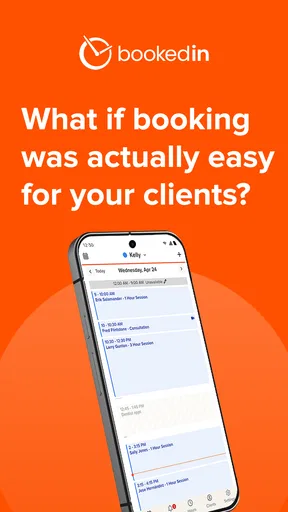
The first thing that struck me about Bookedin for Business was its sleek and intuitive interface. You know how some apps bombard you with options right from the get-go? Well, not this one. It’s refreshingly straightforward. Setting up an account was a breeze, and I was able to import my existing calendar in a matter of minutes. I appreciated how everything was laid out clearly, making it super easy to navigate through the app.
Customizable Scheduling Options
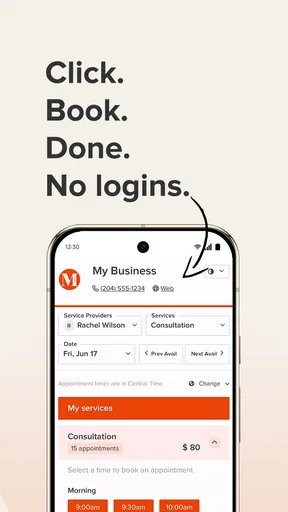
One of the standout features is the customizable scheduling. Whether you’re a solo entrepreneur or managing a bustling business, you can tailor your schedule to fit your needs. I loved how I could set specific availability, block off times, and even allow clients to book directly through the app. It’s like having a personal assistant without the hefty price tag.
Need to reschedule an appointment? No problem! With a few taps, I was able to adjust bookings, and the app automatically notified my clients. This leads to fewer no-shows and happier clients, trust me on this one.
Client Management Made Easy
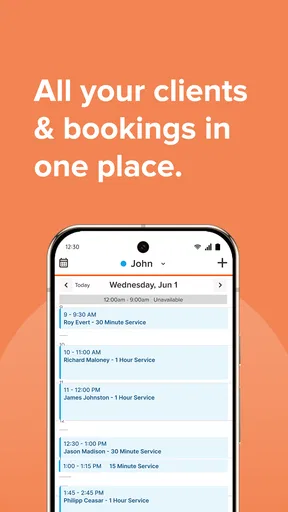
Managing clients can sometimes feel like juggling flaming swords, but not with this app. Each client has their own profile, complete with contact information, appointment history, and any notes you might need. It’s super handy for keeping track of client preferences and ensuring that you’re providing personalized service every time.
The app also supports group appointments, which is a huge plus if you’re running workshops or classes. You can send reminders and updates to multiple people at once, saving you tons of time.
Payment Integration
A feature I wasn’t expecting but absolutely loved was the payment integration. Right from the app, clients can pay for their appointments, which means no more chasing payments. The transactions are secure, and you can track everything from your dashboard. Say goodbye to awkward conversations about money!
Additional Perks
There are a few other nifty features that make Bookedin for Business stand out. For one, the app allows for automatic email and SMS reminders, which can drastically reduce the number of missed appointments. Plus, the reporting feature gives insights into your business operations, helping you make data-driven decisions.
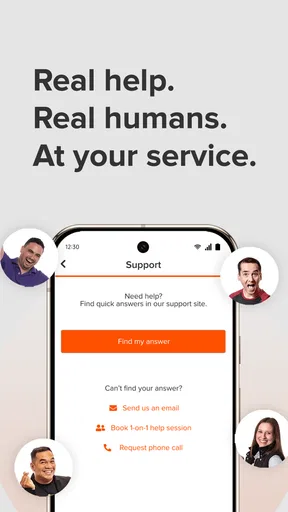
I also noticed the app has a strong support system. Any questions I had were promptly answered by their responsive customer service team. It's always nice to know help is just a message away.
Final Thoughts
So, is Bookedin for Business worth it? In my opinion, absolutely. It streamlines scheduling, simplifies client management, and takes the hassle out of payments. Whether you're a freelancer or managing a team, this app is a game-changer. It’s like having a digital receptionist that never takes a day off.
Overall, if you’re looking to organize your business and save yourself some headaches, give this app a shot. It’s a worthy investment that’ll pay off in efficiency and peace of mind. Happy scheduling!
Pros
- User-friendly interface simplifies scheduling.
- Automated reminders reduce no-shows.
- Integrates well with Google Calendar.
- Customizable booking pages enhance client experience.
- 24/7 online booking increases accessibility.
Cons
- Limited free plan features.
- Mobile app lacks some desktop functionalities.
- No integration with Facebook calendar.
- Occasional syncing issues reported.
- Higher tier pricing may be costly.
FAQs for Bookedin for Business
What features does Bookedin for Business offer?
Bookedin for Business provides features tailored for appointment scheduling and client management. Users can manage bookings, send automated reminders, and accept payments directly through the app. Additionally, it offers calendar syncing, client communication tools, and a user-friendly interface to enhance the efficiency of managing appointments.
Is Bookedin for Business suitable for all types of businesses?
Yes, Bookedin for Business is designed to cater to a wide range of industries. Whether you're in healthcare, beauty, fitness, or any service-based sector, the app offers customizable features that can be tailored to meet specific business needs, ensuring a seamless scheduling experience.
How secure is Bookedin for Business when handling client data?
Bookedin for Business prioritizes security by employing industry-standard encryption to protect sensitive client data. The app ensures that all information is stored securely and provides users with privacy settings to control data access, maintaining trust and confidentiality between businesses and their clients.
Does Bookedin for Business integrate with other tools and platforms?
Yes, Bookedin for Business integrates with various tools and platforms to enhance functionality. It offers synchronization with Google Calendar, Apple Calendar, and other popular scheduling apps, ensuring that all appointments and reminders are up-to-date across different devices and systems.
What kind of customer support is available for Bookedin for Business users?
Bookedin for Business offers comprehensive customer support to assist users. This includes access to a dedicated support team via email and chat, a detailed FAQ section, and helpful tutorials. The support team is committed to resolving issues promptly, ensuring a smooth user experience.


